
How to Install IPTV on Dreambox
Step-by-step guide to install IPTV on Dreambox and other Enigma2 receivers using the XtreamTV plugin, PuTTY telnet, and your device's CPU architecture.
This guide explains how to install IPTV on a Dreambox and other Enigma2 satellite receivers using the XtreamTV plugin. The plugin turns your receiver into a full IPTV player that connects to your provider’s server, so you can watch live channels and VOD directly on your TV.
Note: XtreamTV is a player only. You need an active IPTV subscription to get content. Most providers offer a free 24-hour trial so you can confirm everything works before paying.
What you need
- A Dreambox or other Enigma2 receiver running OpenPLi (or a compatible image)
- A LAN cable and a computer on the same network
- The PuTTY terminal client (putty.org)
- The correct XtreamTV plugin for your box’s CPU architecture
Choose the correct plugin for your CPU
Enigma2 boxes use different processors, so you must download the matching plugin package:
| Plugin | Architecture | Typical boxes |
|---|---|---|
armv7a.ipk | ARM v7 | Newer 4K boxes (VU+ 4K, Gigablue SF4008) |
mips32el.ipk | MIPS 32 | Most boxes (VU+ Zero/Duo, Zgemma, OpenPLi 4+) |
mipsel.ipk | MIPS (older) | Older clones such as DM800, OpenPLi 2.1 |
sh4.ipk | SH4 | Spark boxes |
Alternative
.debpackages (oe25_arm.debandoe25_mips.deb) are also available for OE 2.5-based images if the.ipkfiles do not match your system.
How to install IPTV on Dreambox
- Download the plugin that matches your receiver’s CPU architecture from the list above.
- Connect your Dreambox to your PC using a LAN cable, keeping both on the same local network.
- Install PuTTY on your computer — this is the terminal you’ll use to send commands to the box.
- Open a telnet session in PuTTY by entering your box’s IP address, then run the installation command that corresponds to your plugin package.
- Connect the box to your TV and launch XtreamTV. When prompted, enter the MAC address of your device to activate the service.
- Reboot your receiver to finish the installation.
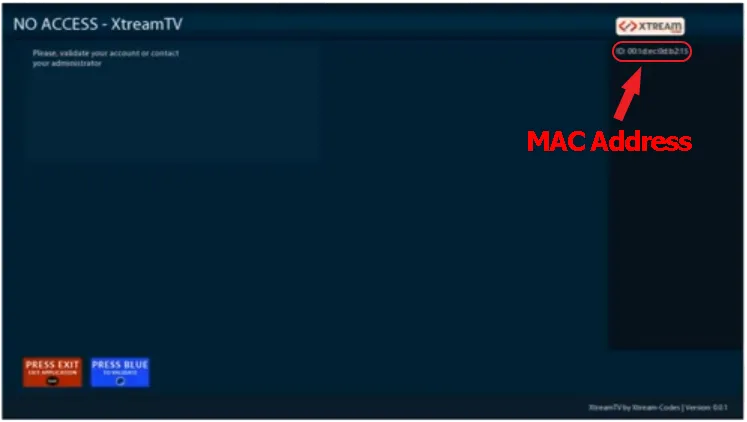
Once your provider authorizes the MAC address, XtreamTV connects to the server and your channel list loads, ready to browse by country and category.

Tip: You can find your box’s IP address in the Enigma2 network settings menu. Make sure telnet access is enabled in your image’s settings.
How to uninstall XtreamTV
If you need to remove the plugin, connect to your box over telnet with PuTTY and run:
opkg remove XtreamTVThen reboot the receiver.
Frequently asked questions
My box won’t connect in PuTTY
Confirm the box and computer are on the same network, that you are using the box’s correct IP address, and that telnet is enabled in your Enigma2 image.
Which package should I download?
Match the package to your processor: ARM boxes use armv7a, the majority of
boxes use mips32el, older clones use mipsel, and Spark boxes use sh4.
How do I get channels?
XtreamTV connects to your IPTV provider’s server. Sign up with a provider (a free 24-hour trial is usually available), then enter your MAC address in XtreamTV so the provider can authorize your device.